
What Is a Digital Business Card? How It Works, What It Costs and Whether It Is Worth It (2026)
A digital business card is a live web profile that holds your contact details and is shared with a link, a QR code or a tap of an NFC card. The person you meet opens it in their phone's browser and saves you to their contacts in one tap. Because the profile lives online, you can change it at any time and every card you have ever shared shows the new details.
It is also called a virtual business card, an electronic business card or an e-business card. They are the same thing.
This guide answers the questions people actually ask about digital business cards. We make one, Lets Connect, so where we describe a feature you can check it in the live demo instead of taking our word for it.
Key points
- A digital business card is a web page, not an app. Nobody needs to install anything to open yours.
- You share it three ways: a link, a QR code, or an NFC card that you tap on a phone.
- A basic card is free. Branding and business tools cost from £49 once with Lets Connect, or US$72 to US$199 a year on subscription products.
- The value is in what happens after the tap: capturing the other person's details and following up.
- You can start with a free digital business card in a couple of minutes.
How do digital business cards work?
A digital business card has three parts.
1. The profile. A page on the web with your name, role, company, phone, email, website and social links. Good ones also carry your work: services, a gallery, documents, a booking link.
2. The way in. Three routes lead to the same page:
- A link. Send it by WhatsApp, text or email, or put it in your email signature and social bios.
- A QR code. The other person points their camera at it. It works on a phone screen, a badge, a slide or a shop window.
- An NFC card. A physical card with a small chip. Hold it near a modern iPhone or Android phone and the phone offers to open your profile. No app, no pairing, no Bluetooth.
3. The save. A "Save contact" button builds a contact file (a vCard) so your name, number, email and company land correctly in their address book.
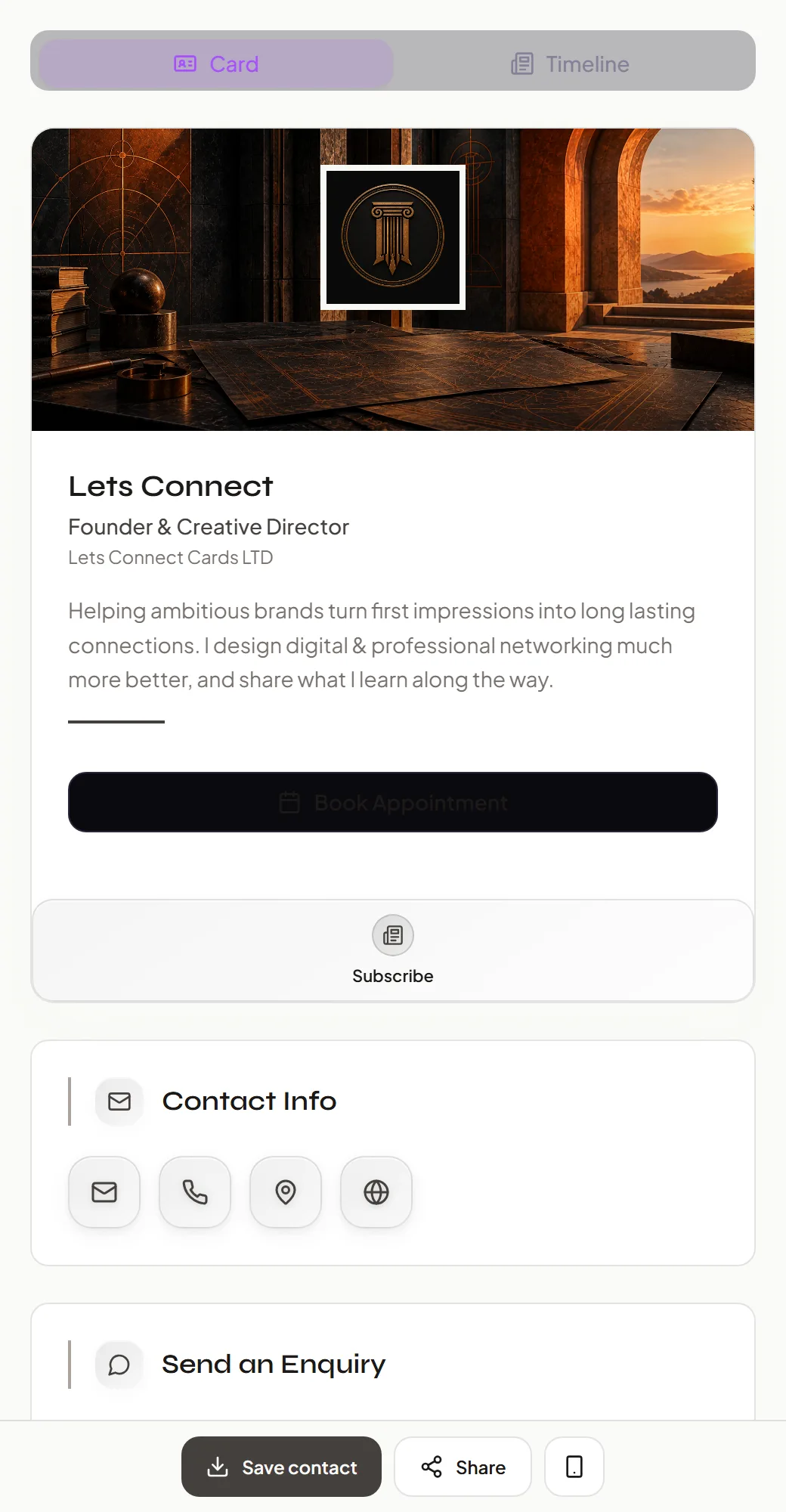
A live digital business card. Open this one yourself.
Digital business card vs paper business card
| Paper card | Digital business card | |
|---|---|---|
| Update your details | Reprint | Edit once; every shared card updates |
| Saves to their phone | They type it in | One tap |
| Captures their details | No | Yes, with lead capture |
| Shows your work | A logo and a line of text | Services, gallery, documents, bookings |
| Tells you who looked | No | Yes, with analytics |
| Runs out | Yes | No |
| Works if they have no signal | Yes | The QR code and NFC need a connection to load the page |
Paper still has a place: it needs no signal and no phone. Many people carry one NFC card and keep a QR code on their phone as a fallback.
How to use a digital business card
In person. Tap your NFC card on their phone, or show your QR code. While they are still with you, ask them to press "Save contact".
After a call or email. Paste your link. It also belongs in your email signature and your LinkedIn, Instagram and WhatsApp bios.
At an event. Switch on lead capture before you go. Visitors leave their own name and email before saving your details, so you leave with a list instead of a memory. How lead capture works.
On printed material. Put the QR code on flyers, vans, packaging and slides. The printed code never goes out of date, because it points at a page you can edit.
How to create a digital business card
- Sign up free. No card details are needed.
- Add your name, role, company, contact details and links.
- Choose a template and your colours.
- Share it with your link or the QR code that is generated for you.
That is a working card. If you want an NFC card to tap, or business tools such as a CRM and bookings, you add them later. The full walk-through is in how to create a digital business card.
How to update a digital business card
Sign in to your dashboard, change the detail and save. The change is live at once on every link, QR code and NFC card you have ever shared, because they all point at the same page. Nothing is reprinted and nobody has to re-scan you.
This is the main practical difference from paper: a new job title, phone number or logo costs nothing.
How to track digital business card views
A digital business card can report what paper never could. With Lets Connect analytics you see:
- how many times your profile was opened, and by how many unique visitors
- which sections were viewed
- which buttons were tapped: call, email, save contact, website
- where leads were captured, by location
Unique visits are counted separately from repeat views, so one keen visitor does not inflate the numbers.
What makes a business card interactive?
A paper card is read. A digital business card is used. The interactive parts are the buttons and forms on the profile:
- Save contact: adds you to their phone.
- Book appointment: they pick a slot from the availability you set.
- Enquiry and custom forms: they send you a brief while it is fresh.
- Review links: one tap to review you on Google, Trustpilot, Facebook or TripAdvisor.
- Subscribe: they join your mailing list.
- Timeline, blog, gallery and products: they see your work, not only your name.
How much does a digital business card cost?
| What you want | Lets Connect | Typical subscription product |
|---|---|---|
| A basic digital card with link and QR | Free | Free |
| Your own branding, templates and analytics | From £49, once | US$72 to US$88 a year |
| CRM, bookings, forms, card scanner, export | £99, once | Up to US$199 a year, or a team plan |
| A physical NFC card | One-off purchase | One-off purchase, sometimes with a plan attached |
Subscription prices are public list prices read on 12 November 2026. The full provider-by-provider table is in our comparison of digital business cards in the UK. Lets Connect plans are on the pricing page.
Are digital business cards worth it?
They are worth it if you meet people and want some of them to become customers, partners or employers. Three reasons:
- Fewer lost contacts. Details go straight into a phone instead of a pocket.
- Follow-up you can act on. With lead capture and a built-in CRM, each person you meet becomes a record with a next step.
- Lower cost over time. A one-off plan replaces every reprint.
They are less useful if you rarely network, or if the people you meet do not carry smartphones. Because a basic card is free, the cheapest way to find out is to make one and use it for a month.
What to look for in a digital business card
- No app for the other person. If they must install something, most will not.
- A one-off price, or a clear total cost. Multiply any monthly price by 36.
- Lead capture and somewhere for leads to go. A CRM inside the product saves buying another.
- Export. You should be able to take your contacts out as a CSV.
- Wallet passes and a QR code, so you can share without the physical card.
Why we built Lets Connect this way
Most digital business cards stop at sharing your details. We think the card is the start of a relationship, not the end of an introduction, so Lets Connect puts the follow-up in the same place as the card: lead capture, a seven-stage CRM, a paper-card scanner, bookings, forms, reviews and analytics, for a single payment.
Lets Connect Card LTD is a UK company, founded in 2024 and based in Wolverhampton. In 2026 it was named a finalist for Rising Star in Workplace Technology at the UC Awards. Our stated aim is to be the first name people think of for business cards, worldwide, by 2028. You can hold us to it by trying the product.
Frequently asked questions
A live web profile holding your contact details, shared by link, QR code or NFC tap. The other person opens it in their browser and saves you to their contacts.
The same thing as a digital business card. "Virtual", "electronic" and "e-business card" are other names for it.
No. A Lets Connect card opens in the browser on any modern iPhone or Android phone, for you and for the person you meet.
Yes. Lets Connect has a free plan with your own link and QR code. Create one here.
No. A link or QR code is enough. An NFC card adds tap-to-share and is optional.
Yes, as often as you like. Every card you have shared updates at once.
The profile shows only what you choose to publish. With Lets Connect you can hide sections, unpublish the card or protect it with a password.
Yes. Team plans add shared branding, a central dashboard and a shared lead inbox. See pricing.
Why Lets Connect is the best digital business card
- Free to start: a digital card with your own link and QR code, no card details needed.
- Pay once: no monthly fee for your card or your lifetime plan.
- The follow-up is built in: lead capture, a CRM, a card scanner, bookings, forms and review links in one dashboard.
- No app on either side: it opens in the browser on iPhone and Android.
